Thumbnail Options
Thumbnail options control whether listings show thumbnail previews, which file types get them, hover pop-up behavior, motion previews, and per-extension exclusions. Users change them under Settings → Profile in the Thumbnail Options section (when settings are not disabled for the account).
Administrators can set default values for new users with userDefaults.preview.* and userDefaults.disablePreviewExt in the instance configuration. Defaults do not retroactively change existing users.
For how thumbnails are generated (sizes, supported formats, server settings), see Thumbnail previews.
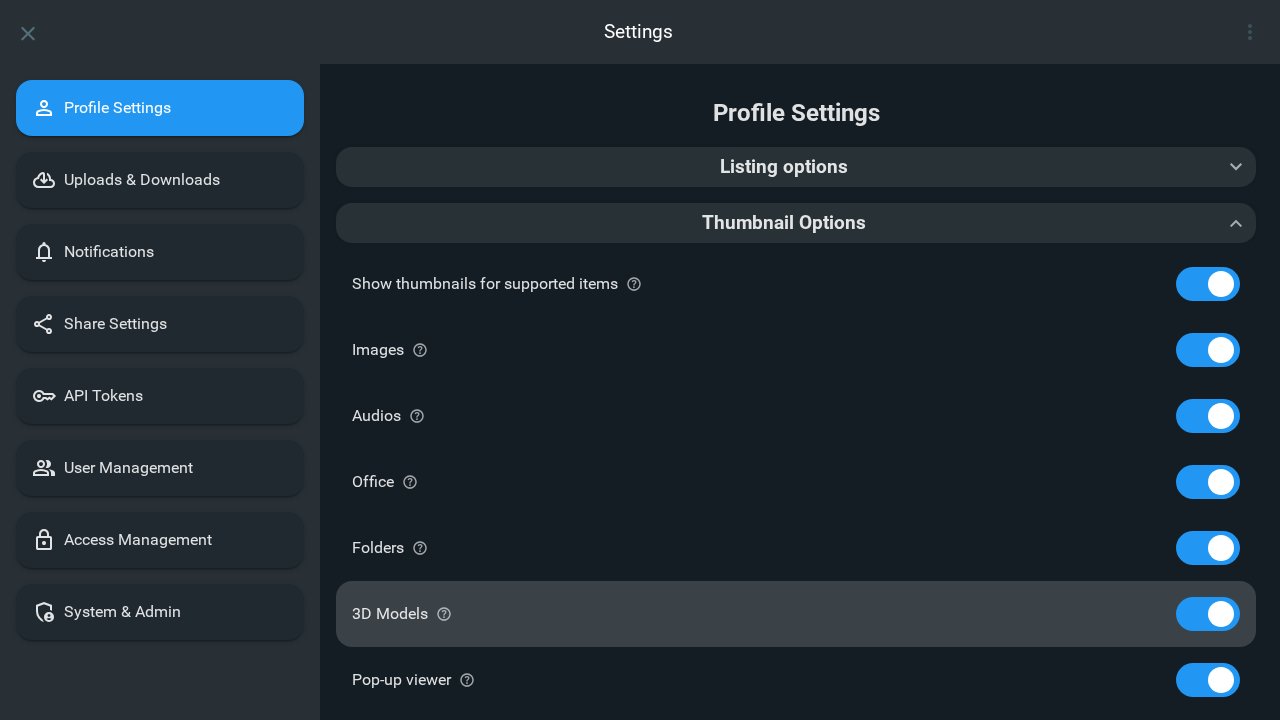
Show thumbnails for supported items
Configuration: controlled by the userDefaults.preview.* toggles (see below)
When enabled, the listing can show thumbnails for supported items. When disabled, thumbnails are hidden for all types until you turn this back on and choose which types to allow.
Images
Configuration: userDefaults.preview.image
Show thumbnail previews for image files in the listing; otherwise a generic icon is used.
Videos
Configuration: userDefaults.preview.video
Show thumbnail previews for video files when available. This toggle appears only when media integration is enabled so video previews can be generated.
Audio
Configuration: userDefaults.preview.audio
Show thumbnail previews for audio files in the listing; otherwise a generic icon is used.
Office
Configuration: userDefaults.preview.office
Show thumbnails for office-related file types in the listing view. Some options may not appear if office integration is not available.
Folders
Configuration: userDefaults.preview.folder
Show thumbnail previews for folders using a previewable child as the cover (or multiple items when motion preview is enabled).
Models
Configuration: userDefaults.preview.models
Show thumbnail previews for supported 3D model files.
Pop-up viewer
Configuration: userDefaults.preview.popup
When enabled, an overlay opens while you hover over items that have thumbnails, showing a larger preview.
Motion previews
Configuration: userDefaults.preview.motionVideoPreview
Shown only when Pop-up viewer is on and either Videos (with media integration) or Folders is on. Motion preview is an animated pop-up that cycles through video frames or multiple folder images.
Disable thumbnails for certain file extensions
Configuration: userDefaults.disablePreviewExt
Enter a space-separated list of extensions (for example .txt .html) and save to skip thumbnail generation for those types; listings fall back to generic icons for matches.